Resets and drift correction
Which reset should you use?
If your avatar's direction shifts, you do not need to repeat the entire setup. Choose the reset that matches the situation.
Which reset do I need?
| Situation | Recommended action |
|---|---|
| Overall direction shifted, but Trackers have not moved | Yaw reset; set up the shortcut |
| Trackers put on again, straps adjusted or positions changed | Full Reset, then Mounting Reset |
| A foot Tracker moved or toes point the wrong way | The resets above, then Foot Mounting Reset |
| Short break with Trackers still on | Check direction; use yaw reset/Full Reset if needed |
| New VRChat avatar | In-game FBT calibration |
| Incorrect leg length, waist height or foot-floor position | Check body proportions and headset floor height |
Quick reset: double-tap your chest Tracker
Enable Settings → Gesture control → yaw reset in SlimeVR. Double-tap the chest Tracker to reset horizontal direction.
This is a yaw reset. After putting Trackers on again or for other pose problems, use Full Reset and Mounting Reset as described below.
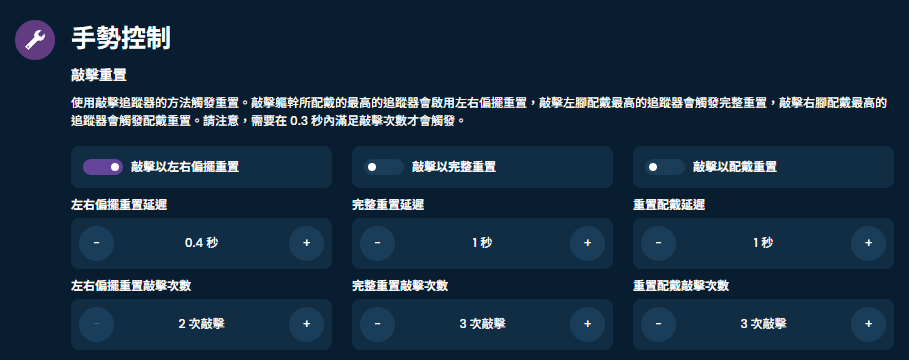
Full Reset: realign your direction
Stand naturally with feet about shoulder-width apart and arms resting down. Face your head and body in the same forward direction, stay still briefly, then run SlimeVR's Full Reset.
Look ahead and settle into the pose before pressing reset.
Mounting Reset: realign mounting angles
After rewearing or a slipped strap, check assignments and mounting directions first, then perform Full Reset and Mounting Reset.
For Mounting Reset, take a shallow skiing squat: bend your knees with legs close together, lean forward, bend your arms and bring your hands near your chest. Keep upper arms close to your body if you have upper-arm Trackers.
The interface may show a translated name for Mounting Reset. See the Calibration guide for the full pose.
If you have foot Trackers
After the regular Mounting Reset, perform Foot Mounting Reset following the demonstration. Lower-leg/ankle-only setups do not need it.
Do I need to redo body proportions every time?
The same user's proportions can be saved. After rewearing, focus on aligning Tracker positions and angles; powering on does not mean you need to measure yourself again.
Adjust proportions when a different person uses the set or the previewed body shape is unsuitable.
If you tune proportions to match a particular avatar, you may need a different setup for each avatar.
Direction shifts again soon after resetting?
Check for slipped straps, clothing moving the Trackers and incorrect mounting directions. On Mini 2/Pro with the magnetometer enabled, compare performance in another position.
If there is also stuttering or disconnection, see Connection troubleshooting. For direction and pose problems, see Tracking troubleshooting.
Trackers automatically collect calibration data after being still for more than 30 seconds; repeated manual sensor calibration is normally unnecessary. After using them for a while, you can try removing the straps and leaving the Trackers still on a flat surface to trigger automatic calibration.
If drift continues, check continuous calibration settings; enabling it can have the opposite effect in some situations. Large changes in room temperature can also make direction shifts more likely.