Using the magnetometer
Just what the title says.
Mini 2 and Mini 2 Pro have a magnetometer that gives tracking direction an extra reference, extending the interval between resets. It is off by default; we recommend enabling it for everyday use.
If your environment has a lot of metal, such as a spring mattress, leave it off initially. Briefly approaching metal objects can be corrected automatically, so that alone is not a reason to turn it off.
Which models have one?
| Model | Magnetometer |
|---|---|
| Mini 2 | Yes, MMC5603 |
| Mini 2 Pro | Yes, MMC5983 |
| Mini 2T | No |
| Lite 2 | No |
How to enable it
Enable the magnetometer here
Connect your receiver to send the enable command. Afterward, restart SlimeVR and check the status in Tracker details.
Select the correct device. Disconnect any other card or tool using that device first.
send all mag onChecking browser support…
How to disable it
Disable the magnetometer
Keep your Trackers powered on. Afterward, restart SlimeVR and check the status in Tracker details.
Select the correct device. Disconnect any other card or tool using that device first.
send all mag offChecking browser support…
Restart SlimeVR after either change
Restart SlimeVR after enabling or disabling the magnetometer.
Check its current status
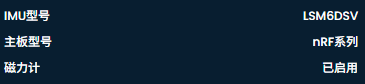
Open a Tracker's details from the SlimeVR device list to view magnetometer status.

Is extra calibration needed?
The magnetometer automatically collects data during everyday use. You normally do not need separate manual calibration each time. Put on your Trackers and perform Full Reset and Mounting Reset as usual.
See Body proportions and calibration.
How does it affect battery life?
| Model | Magnetometer on | Magnetometer off |
|---|---|---|
| Mini 2 | Approx. 35 hours | Approx. 50 hours |
| Mini 2 Pro | Approx. 42 hours | Approx. 50 hours |
These are reference figures; plan charging around your usage.
For more direction and pose issues, see Tracking troubleshooting.