What's in the box
Get to know the tracking configurations and accessories.
Before setting up your new kit, take a moment to check what each accessory does. Contents vary by model and set, so compare them with your purchase listing.
What do 6, 8 and 10 points mean?
A “point” here means one physical Tracker. More Trackers capture movements from additional body parts; choose based on what you want to track.
| Set | Suggested body parts |
|---|---|
| 6-point | Chest, waist/hip, both thighs, both lower legs/ankles |
| 8-point | The 6-point setup plus both upper arms or both feet |
| 10-point | The 6-point setup plus both upper arms and both feet |
In VR, your headset usually tracks your head and controllers track your hands. They are not included in the set's Tracker count. With an 8-point set, choose upper arms or feet to suit your needs. See Wearing positions.
What's included in a Mini set?
- One set of Trackers: 6/8/10 depending on the set.
- A charging dock.
- One strap per Tracker.
- One lanyard quick-release clip per Tracker.
- A receiver.
- A USB Type-C data cable.
- Body-part stickers.
For Lite set contents, check the product listing you purchased.
What are the accessories for?
| Accessory | Purpose |
|---|---|
| Tracker | Worn on your body to capture movement |
| Dawn Tracker receiver | Connects to your device and receives Tracker data |
| Antenna | Used by the Mini 2 series and advanced Lite receiver; the basic Lite receiver has no external antenna |
| USB data cable | Connects the receiver to your device; also used for wired pairing/service |
| Mini charging dock | Charges Mini Trackers; its data slot can also be used for pairing/updates |
| Type-C cable | Charges Lite 2; a data cable can also be used for wired pairing/service |
| Straps and mounts | Keep each Tracker securely attached to its assigned body part |
| Stickers | Mark assigned body parts to make the next session easier |
After unboxing
- Check the model, color and Tracker count.
- Check the condition of the products and that all accessories are present.
- Charge the Trackers and prepare the receiver and data cable.
- Follow the Quick start guide and check that every Tracker connects.
- Label each Tracker after assigning body parts.
If anything is missing or damaged, keep the packaging, take photos and contact us.
Straps and quick-release clips
Adjust straps so they stay in place without feeling uncomfortably tight. Walk a few steps, bend your knees and lift your legs to check that your Trackers stay put.
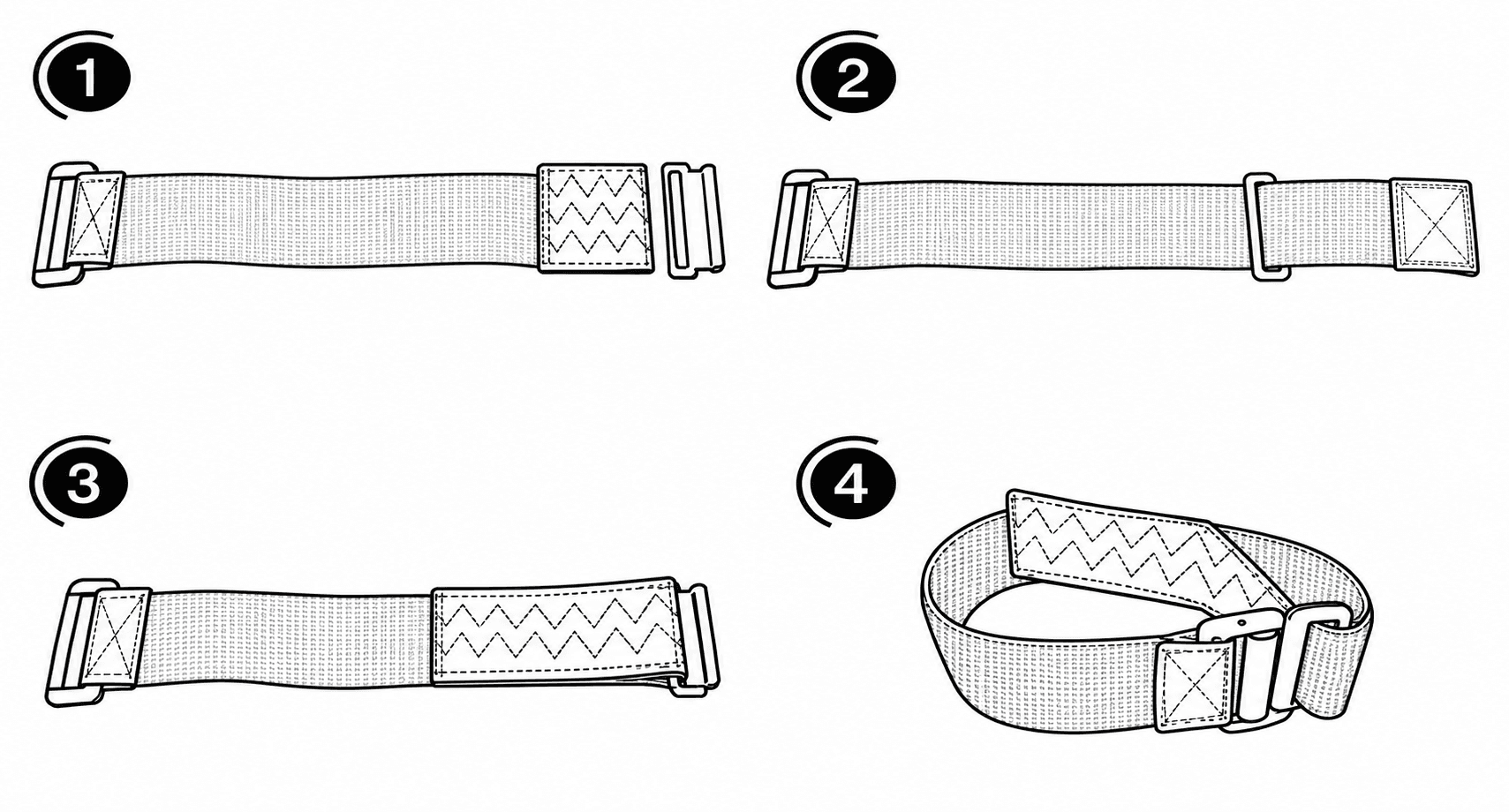
See the accessory demonstration video for the quick-release clips.